Orchestrator for Forgejo, Gitea, GitHub and GitLab

Coding agents work through your issues.

For every ready issue Gitoodo starts an agent on your own subscription and merges the pull request. When a decision is missing, the question lands as a card in your menu bar.

Coming soon · Free · Open source (MIT) from the first release · macOS (Apple silicon) and Windows 10/11

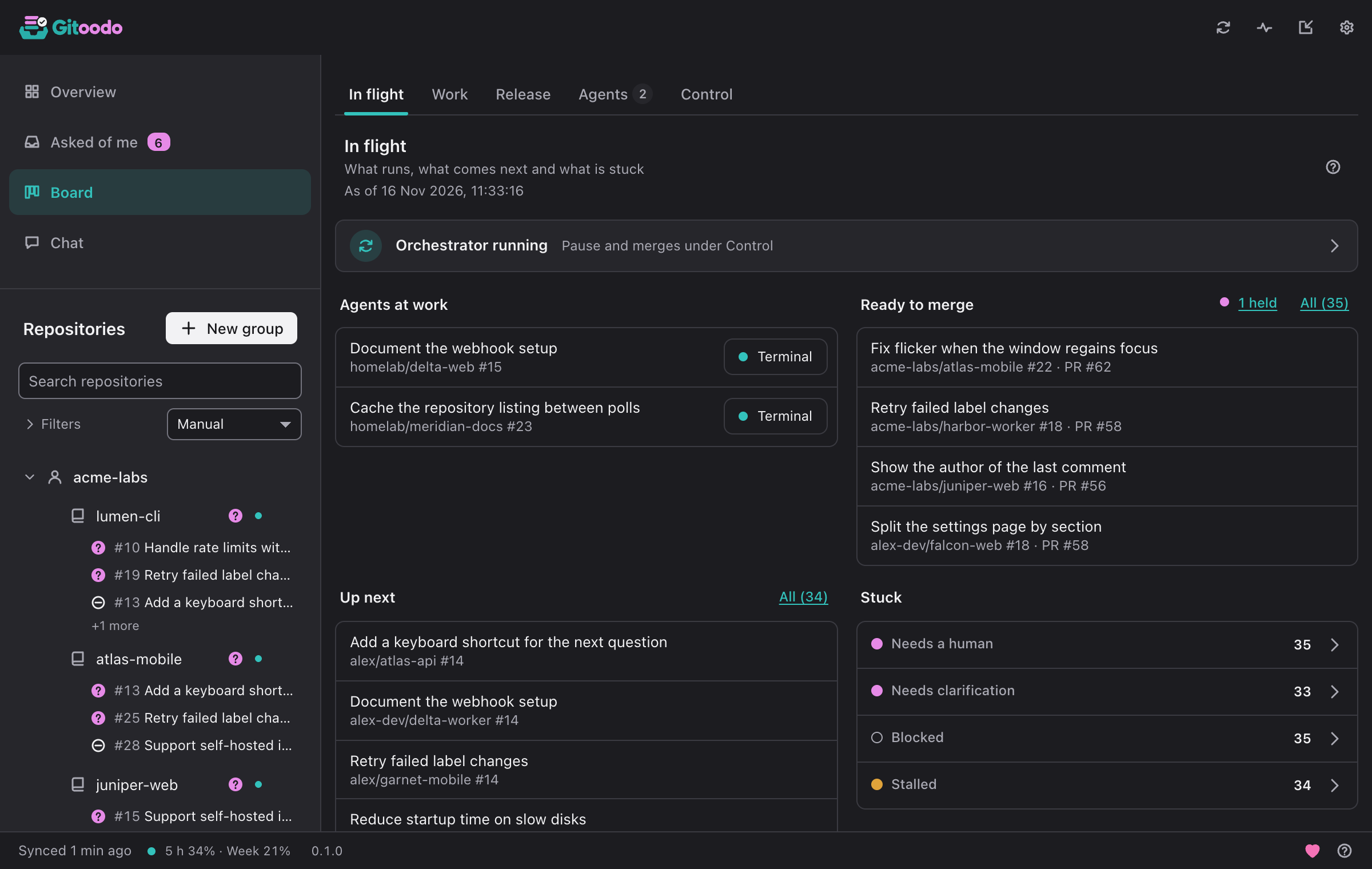
The board: issues per repo with status, dependencies and pull requests.
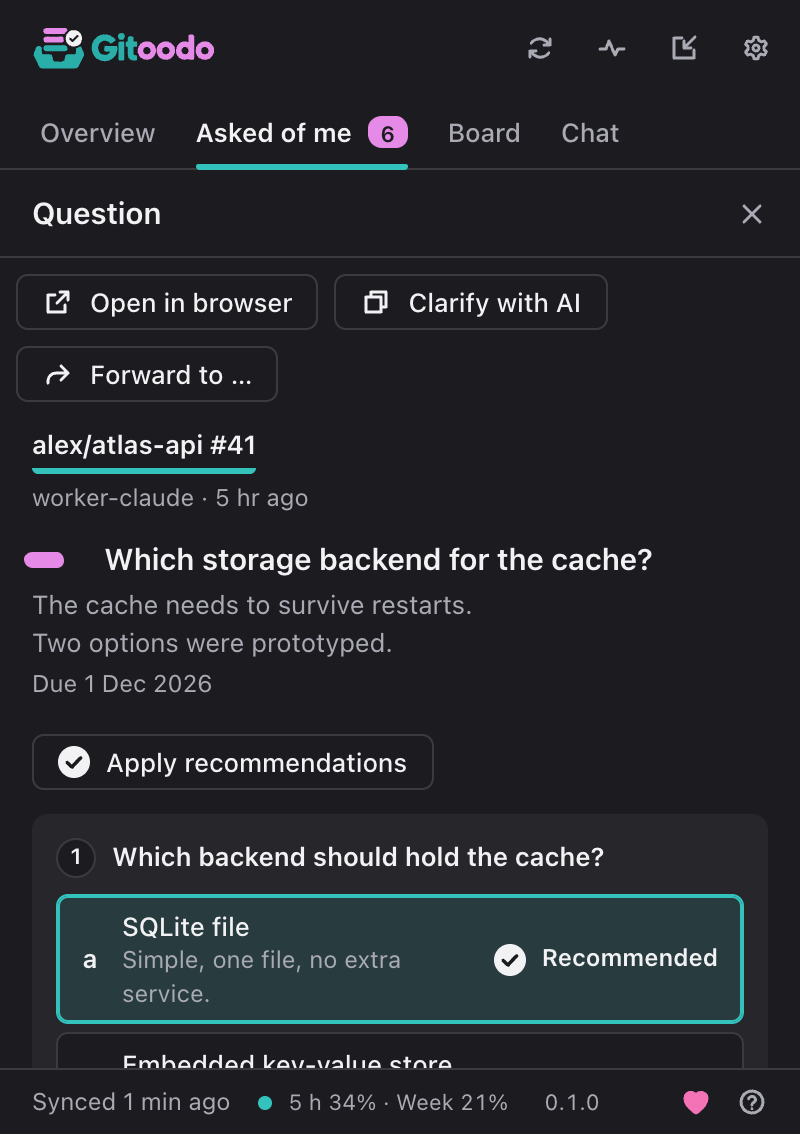
A question card with two options, the agent's recommendation preselected.

Works with

  • Claude Code
  • Codex
  • Gemini CLI
  • Forgejo
  • Gitea
  • GitHub
  • GitLab
Video without sound: an issue becomes ready, an agent picks it up, asks a question, gets the answer, and the pull request is merged.

From a ready issue to the merge, as a short video without sound.

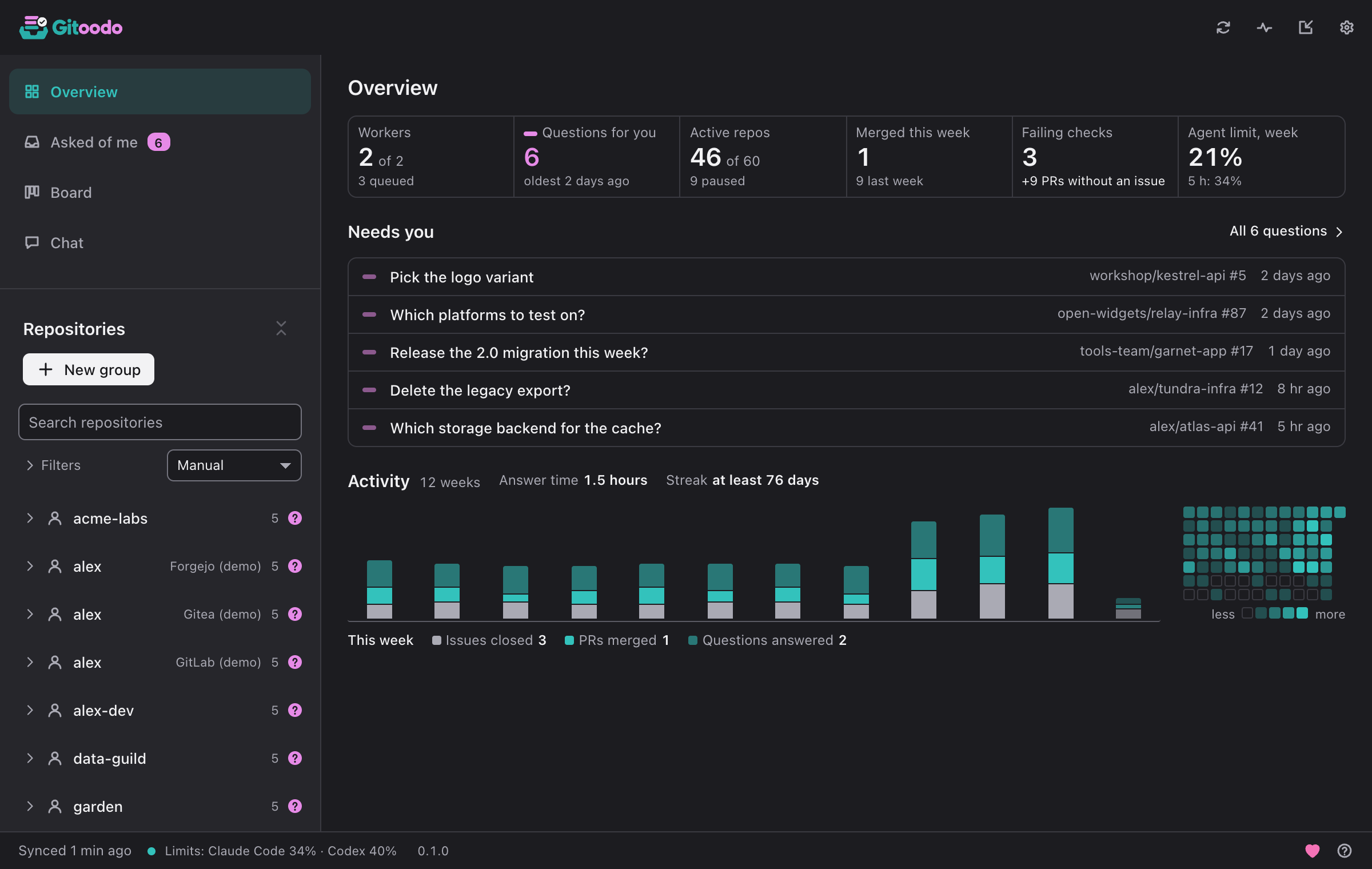
The overview: figures on workers, questions and merges, the questions waiting for you and the activity of recent weeks.

The overview shows at a glance what waits for you and what is running.

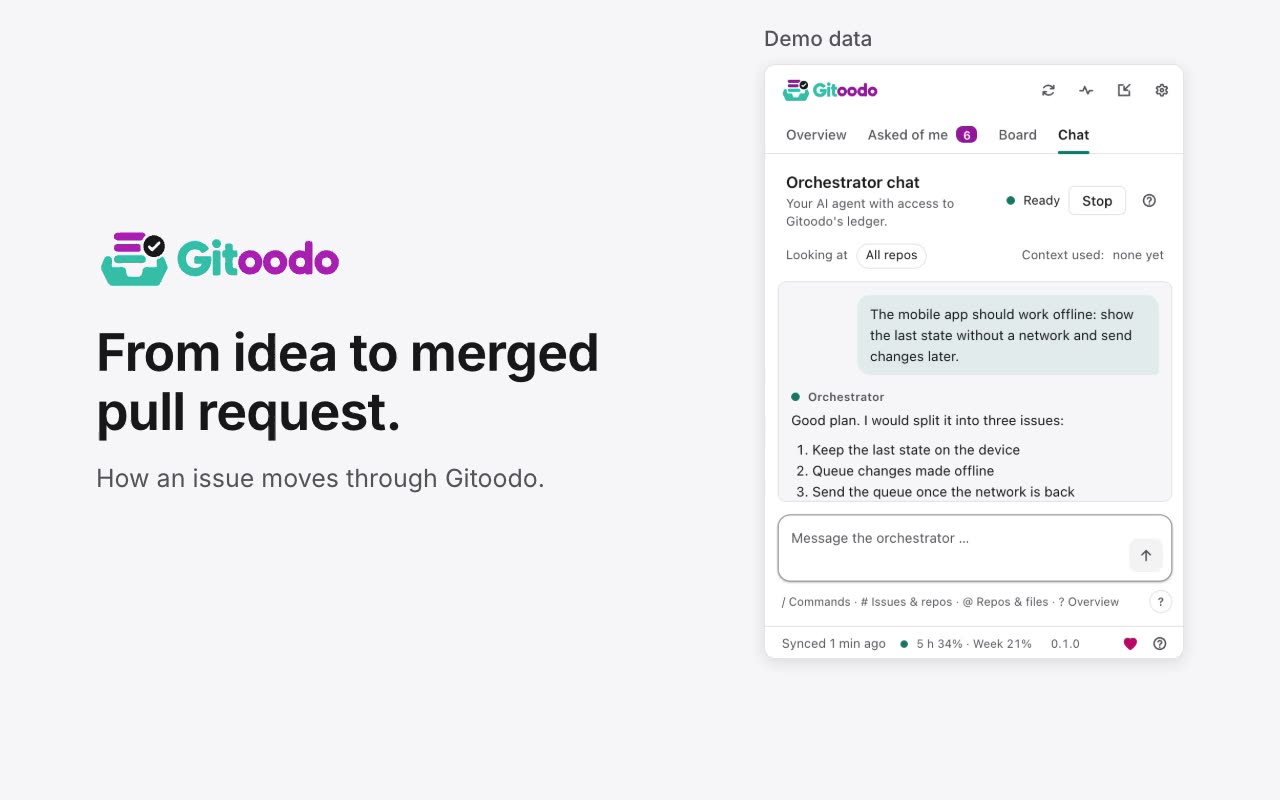
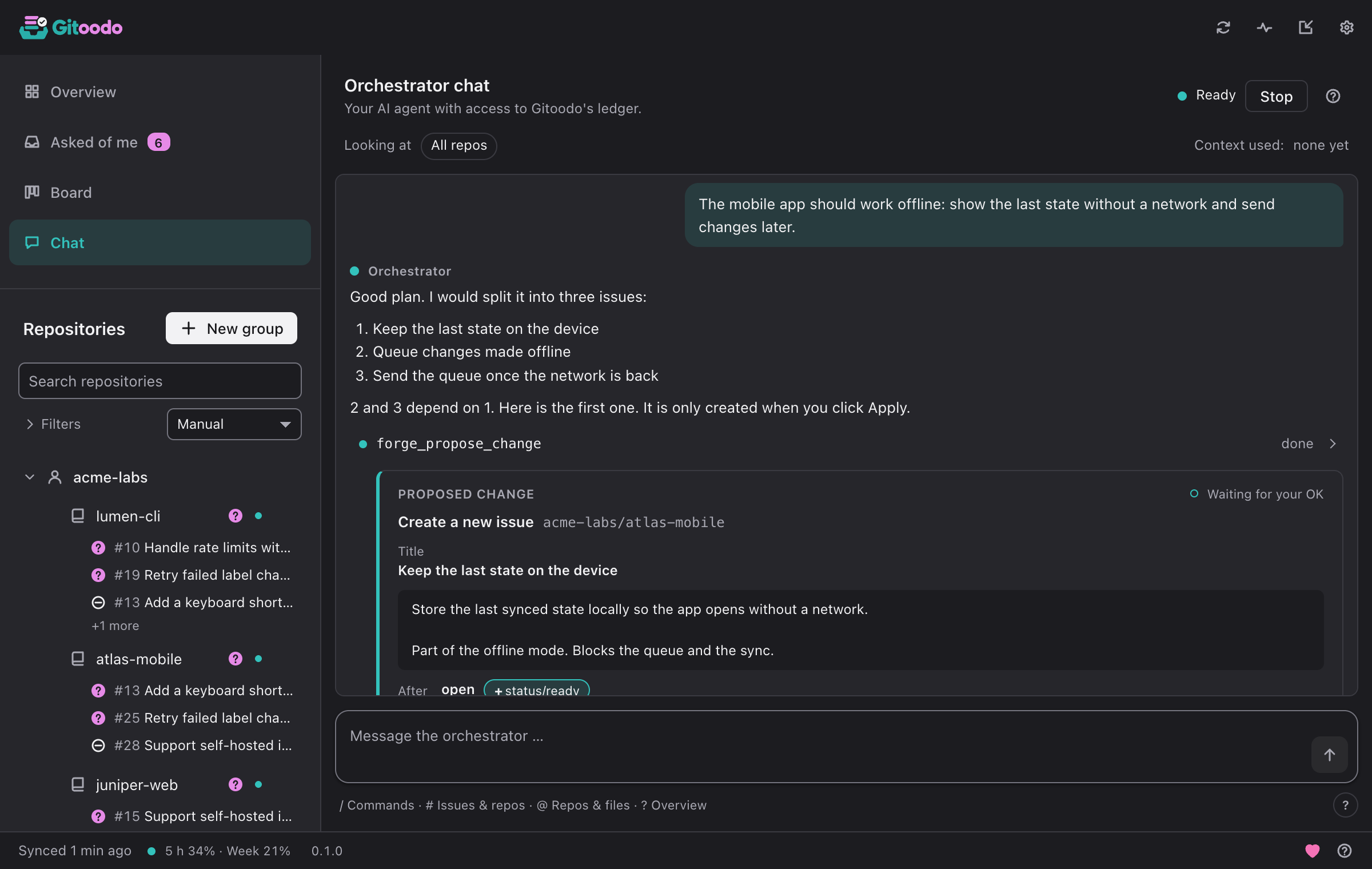
The orchestrator chat with a proposal card waiting for “Apply”.

The chat proposes changes. Nothing is written until you click “Apply”.

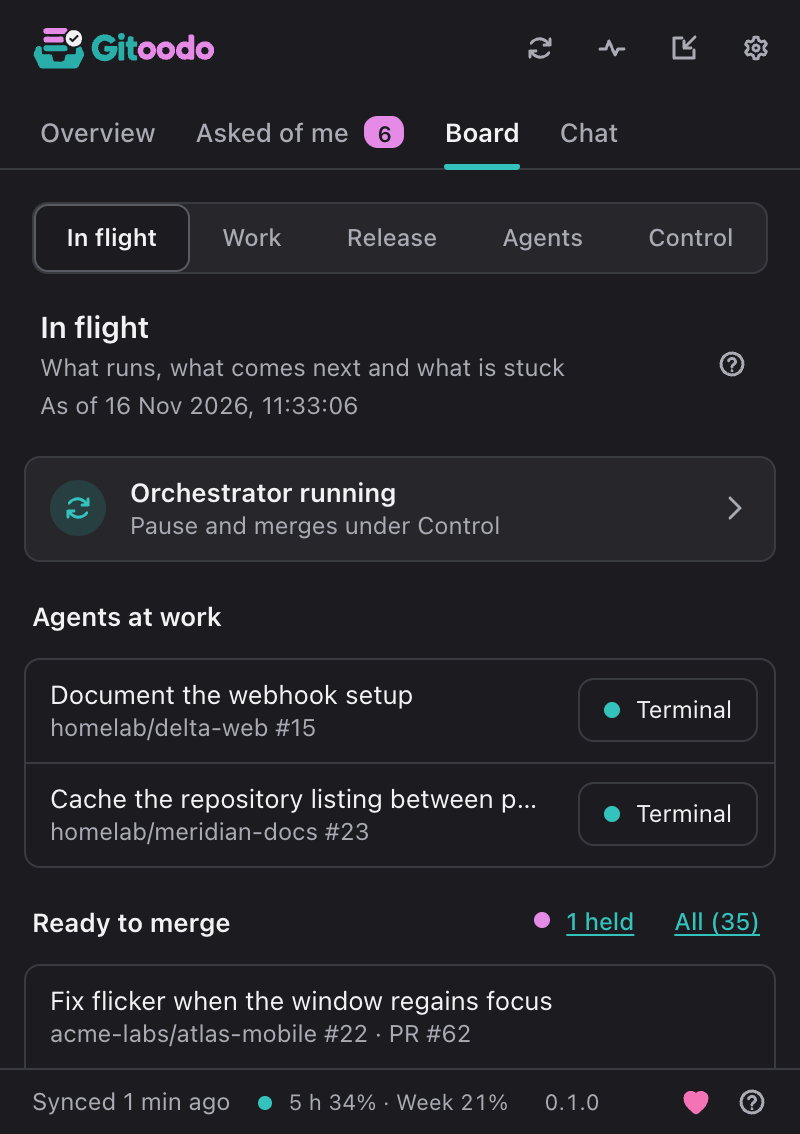
The board: issues per repo with status, dependencies and pull requests.

The board reads the state from your issues and labels.

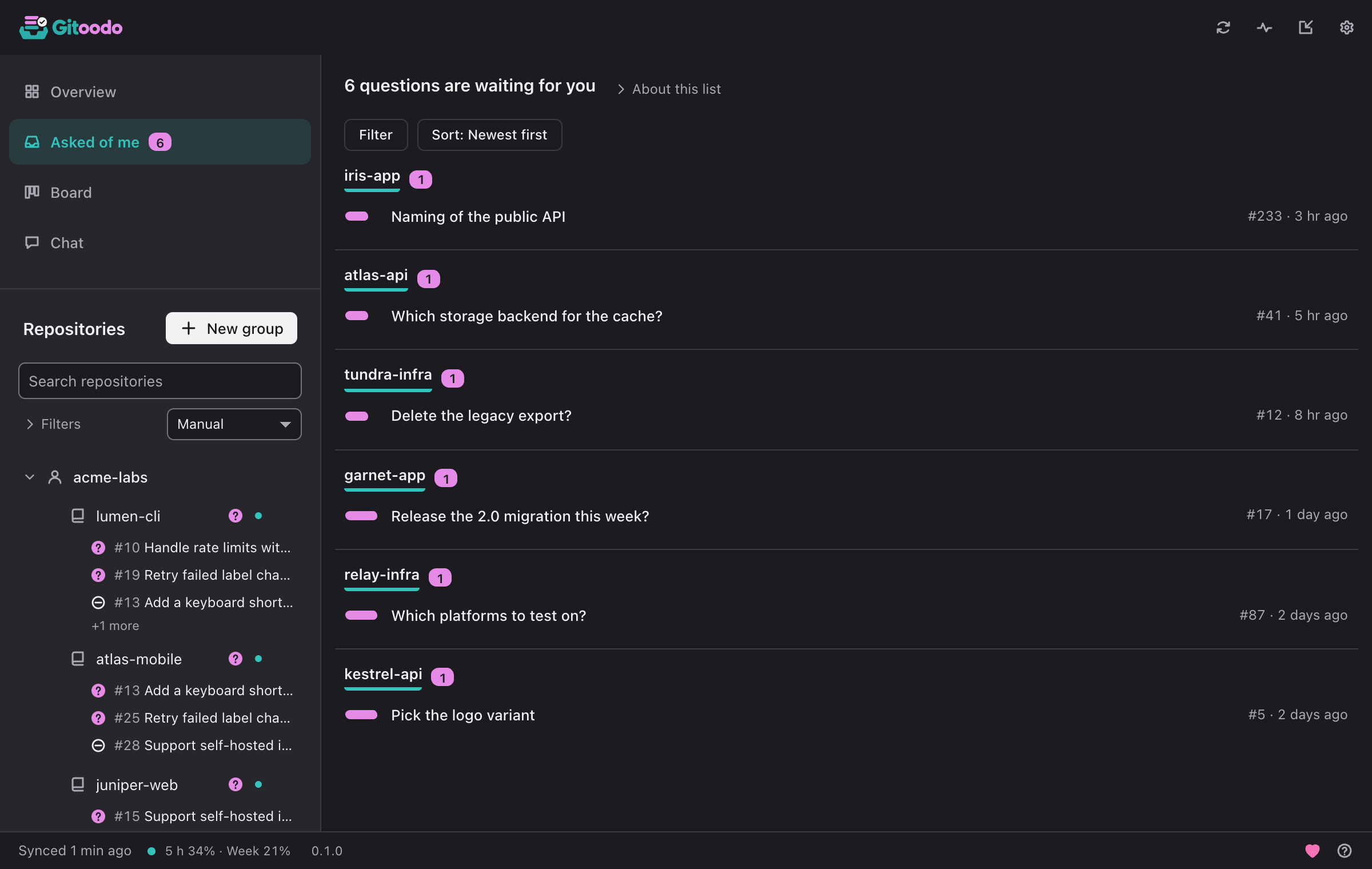
The question list: open agent questions with deadline and repo.

Every open question from an agent, with deadline and repo.

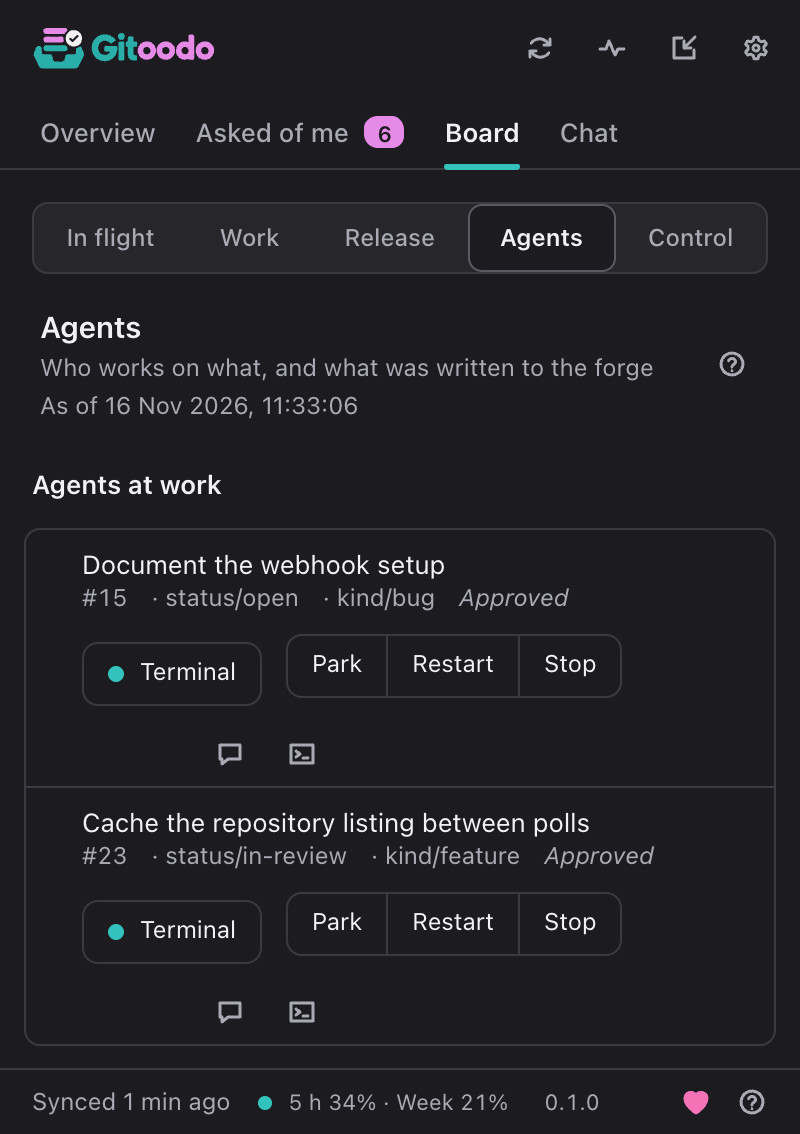
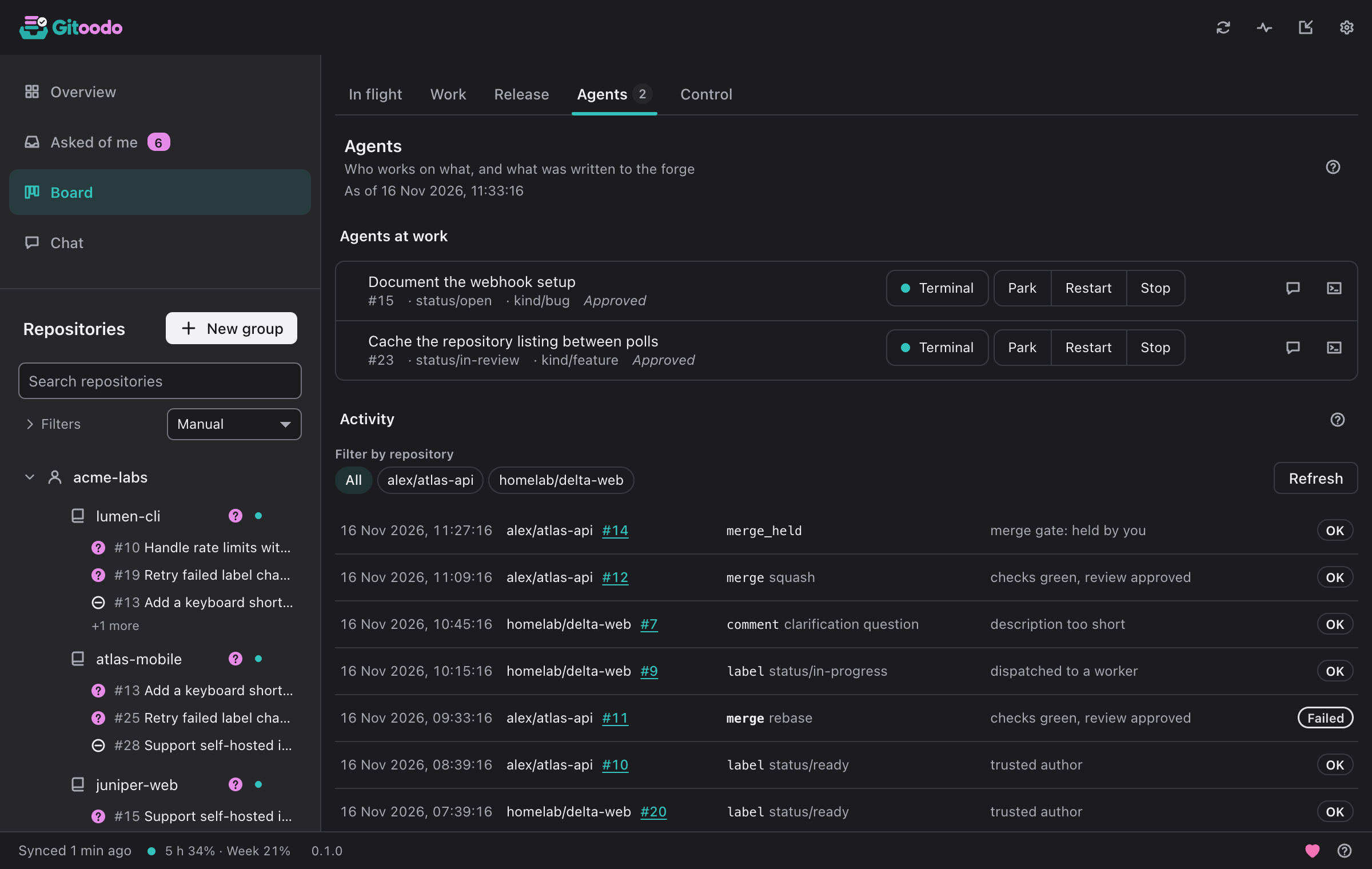
The worker view: running agents per issue with park, restart and terminal.

Every running agent, with park, restart and terminal.

From issue to merge, without you in between.

Gitoodo reads your forge, hands ready issues to coding agents on this machine or others, and merges once the checks are green. You set the goals and the architecture, decide when an agent asks, and stay in full control throughout.

You no longer write every line; you steer: direction, architecture, sign-off.

  • Every change arrives as a pull request and merges only with green checks, in your merge style.
  • Agents ask on the issue instead of guessing; the question waits for you.
  • Pause everything or one repository at any time, hold or veto any pull request.
An idea becomes an issue: in the Gitoodo app or directly in your forge.GitHub, Forgejo, Gitea or GitLab: issues, comments, pull requests and checks live here.Checks author and content and sets ready; otherwise it first asks for approval or clarification.Queues ready issues by priority and age and picks a machine with a free slot.Each worker is a coding agent in its own worktree and branch.More machines where the dispatcher starts workers over SSH. No token leaves your machine.The Gitoodo app: your ideas become issues in the forge, and an agent's question arrives here as a card. Your answer goes to the issue.The worker opens it with Closes #N; the issue gets in-review.Nothing merges before the checks are green. Failing checks restart the worker on the same branch.In your merge style, pinned to the checked commit. Then the issue closes and the worktree is cleaned up.

The steps in detail

  1. An idea becomes an issue: in the Gitoodo app or directly in your forge (GitHub, Forgejo, Gitea or GitLab).
  2. The classifier checks author and content and sets ready; otherwise it first asks for approval or clarification.
  3. The dispatcher queues ready issues by priority and age, picks a machine with a free slot and marks the issue in-progress.
  4. A worker takes it: a coding agent in its own worktree and branch, on this machine or on a remote machine over SSH.
  5. When the agent needs a decision, it asks on the issue. The issue waits with needs-human and the question reaches you as a card in the Gitoodo app.
  6. Your answer goes to the issue. The classifier sees it, the issue is ready again and continues on the same branch.
  7. The worker opens the pull request with Closes #N, and the issue gets in-review.
  8. The dispatcher waits for the checks. Failing checks restart the worker on the same branch.
  9. Once the checks are green it merges in your merge style, closes the issue and cleans up the worktree.

A project on its way to release

  1. Project

    You describe in the chat what you want to build.

  2. Issues

    It becomes issues with dependencies and priorities.

  3. Ready

    #41 was blocked by #38. Once that is merged, it is ready.

  4. Agent

    An agent works in its own worktree and opens the pull request.

  5. Merge

    Merged in your repo's style, worktree and branch are gone.

From a conversation in the chat to a merged pull request.

Gitoodo has no board or database of its own. What needs doing is in your issues, and that is where every result ends up too.

In the chat you talk through what you want to build.

The orchestrator chat is a session of the coding agent you picked in the settings, with Gitoodo's tools. When it proposes issues, labels or comments, it shows a card. Nothing is written until you click “Apply”.

Type / for commands such as /status or /pause, # for issues and pull requests, @ for repos and files. If something is off, /doctor checks accounts, services and agents in one list.

You break a larger project down together: it proposes every new issue as its own card, with title, text and labels.
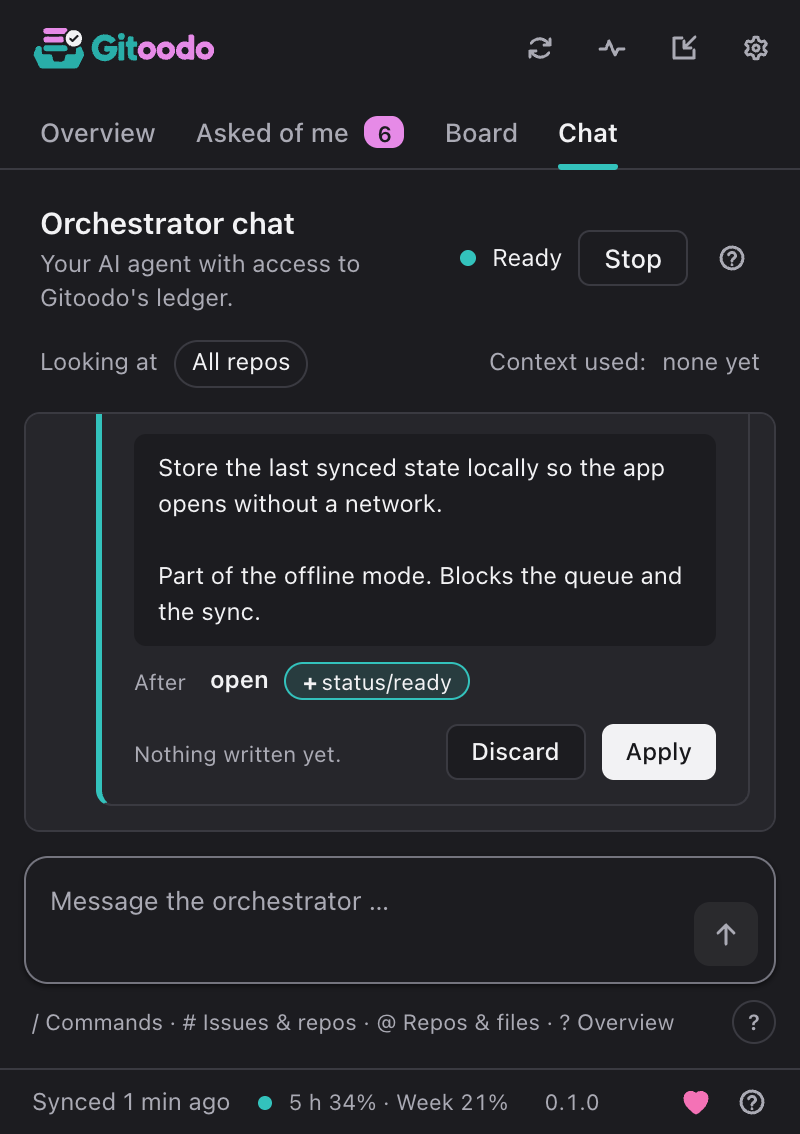
The orchestrator chat with a proposal card waiting for “Apply”.

What comes next is already in your issues.

Gitoodo reads labels, dependencies and priorities from p0 to p3 and works out which issue is ready. It reports cycles in the dependencies. When Gitoodo restarts, it reads the state from the forge again.

It maintains the status labels ready, in-progress, in-review and blocked itself. A bar per repo shows how much of the next release is done.

The board: issues per repo with status, dependencies and pull requests.

One agent per ready issue, all the way to the merge.

Only a real merge conflict lands with you. If one issue fails, the others keep going.

  1. An agent starts in its own worktree. A lease keeps two agents from taking the same issue.
  2. If an agent hangs, Gitoodo restarts it.
  3. The pull request is updated and merged in the style your repo allows: squash, merge, rebase or fast-forward.
  4. Then Gitoodo removes the worktree and the branch.

You can park, restart or stop any worker, move an issue to the front and pause a repo. For every worker you can attach to the running terminal.

For Claude Code and Codex, the status bar shows how much of your subscription's quota is used. From 90 % (adjustable), Gitoodo starts no new workers with that agent.

⌘⇧A opens an agent session of your own in the system terminal, in the working copy or in a fresh worktree.

The worker view: running agents per issue with park, restart and terminal.

When the agent needs a decision, it asks you.

The agent asks with gitoodo ask or the skill. The question appears as a comment on the issue and as a card in your menu bar, with its recommendation already selected. You answer with one click or type 1b 2 yes.

The tray counter shows how many questions are waiting. With “Discuss with AI”, Gitoodo drafts an answer that only goes to the issue after your OK.

A question card with two options, the agent's recommendation preselected.

What helps day to day

Help inside the app, a review once a week, and the settings you would otherwise write your own script for.

  • Help center and tour

    Searchable help in the ? menu and a short tour of the tabs, sidebar and status. You can start it again at any time.

  • Weekly review

    Once a week a card shows the last seven days: questions answered, median answer time, pull requests merged and issues closed.

  • Forward questions

    Hand a question addressed to you to someone you trust, and the issue is assigned to them. Rules per repo send questions to the right person by label.

  • Your merge style

    Squash, merge, rebase or fast-forward, for all repos or per repo. Gitoodo keeps the branch up to date before the merge.

  • Set up repos without a script

    The setup assistant checks several repos at once, creates missing labels and shows which repo settings are still missing. Old labels move over only after a preview.

  • Several accounts, tokens in the keychain

    Several accounts per forge, self-hosted too. The token assistant lists exactly the scopes the mode needs. When the system asks for approval, Gitoodo shows “Allow access”.

  • Ready in one window

    Onboarding connects the account, picks the repos and sets up the orchestrator for all of them in one click. Before that it checks that the agent is signed in.

  • /doctor instead of guesswork

    One checklist for accounts, sync, forge access, services, CLI versions, worker login and the skill. Every row names its fix.

  • Outside contributions in one batch

    Gitoodo collects issues from outside contributors for approval, yes or no per item. Issues from trusted authors count as ready straight away.

  • Your second machine joins in

    Workers also run over SSH on other Macs or PCs. Gitoodo checks the host key, and the forge tokens stay on the main machine.

  • Work that starts by itself

    Automations run a prompt on a schedule or on an event. On top come seven built-in rules per repo, each one can be switched off.

  • Notifications in your team chat

    Slack, Teams or Matrix via webhook. Whoever is asked gets mentioned there, and if you like, a summary arrives once a day.

What Gitoodo takes off your hands

Compared with an agent you start yourself in the terminal, and with the issue tracker on its own.

TaskGitoodoStarting the agent yourselfIssue tracker alone
An agent starts for every ready issueYesOne by one, by handNo
The next issue follows from dependencies and priorityYesNoYou sort it yourself
Agent questions reach you as a card with a recommendationYesOnly in the open terminalAs a comment
Its own worktree per issue, cleaned up afterwardsYesBy handNo
Merged in the style your repo allowsYesBy handBy hand
The state lives in your issuesYesNoYes

Frequently asked questions

What does Gitoodo cost?

Nothing. Gitoodo is under the MIT licence. Support is voluntary and unlocks nothing.

Do I need an API key?

No. Gitoodo starts the agent's command line, which runs on your subscription. Workers never see an API key.

Which coding agents can I use?

Claude Code, Codex and Gemini CLI, in the chat and for the workers. In the settings you pick the agent and the model for each step.

Does it work with an agent I start myself?

Yes. Copy the instructions from the skill into your repo's instruction file, such as AGENTS.md. That agent then asks in the question format too, and Gitoodo shows its question as a card. The skill and the question format are linked at the bottom of the page.

Do I have to write every issue myself?

No. Write issues yourself on your forge or on the board, or describe in the chat what you want to build: it proposes every issue as its own card and creates it once you click “Apply”. Either way, an agent picks the issue up as soon as it is ready.

Does anything run in a cloud?

No. The agents run on your machines, and the state lives in your forge. You need no Gitoodo account, your tokens stay in the system keychain, and the app sends anonymous usage statistics to our own server in the EU: on by default, no cookies, never with repo names, contents or tokens, and switchable off at any time.

Which forges are supported?

Forgejo, Gitea, GitHub and GitLab, self-hosted too and with several accounts.

Which systems does Gitoodo run on?

On macOS with Apple silicon and on Windows 10/11. The app comes in six languages, Arabic right to left, light and dark, and can be operated entirely by keyboard.

What happens on a merge conflict?

The issue gets the label needs-human and lands with you. The other issues keep going.

Can I show that a repo is orchestrated with Gitoodo?

Yes, with a static badge that loads nothing from third parties. Paste this Markdown into your README: [![Orchestrated with Gitoodo](https://silvio-l.github.io/gitoodo/badge/orchestrated-with-gitoodo.svg)](https://silvio-l.github.io/gitoodo/)

Is Gitoodo in the App Store or Microsoft Store?

Not yet. A store version is prepared, but the store sandbox limits it to answering questions and showing the overview: starting agents and merging only work with the download from this page.

Coming soon

The first release is on its way.

Gitoodo is not released yet. The first version for macOS and Windows is being finished, and the source code goes public with it under the MIT licence. Leave your email address and we will write to you once when it is out.

Coming soon · Free · Open source (MIT) from the first release · macOS (Apple silicon) and Windows 10/11

Support development

Gitoodo is open source and stays fully usable. If it saves you work, you can support its development voluntarily. It unlocks nothing.

You choose the amount at the provider. Monthly only if you pick it there.

Send me the link

Write to us

Your message reaches us by email and is not published.

What is it about?

Please leave out tokens and credentials.

Without an address we cannot reply.

We send your message, the category, your address if given, and this page's language and path. Privacy