للمستخدمين · الاستخدام اليومي
اللوحة
بعض أجزاء هذه الصفحة غير متاحة بعد باللغة العربية وتظهر بالإنجليزية.
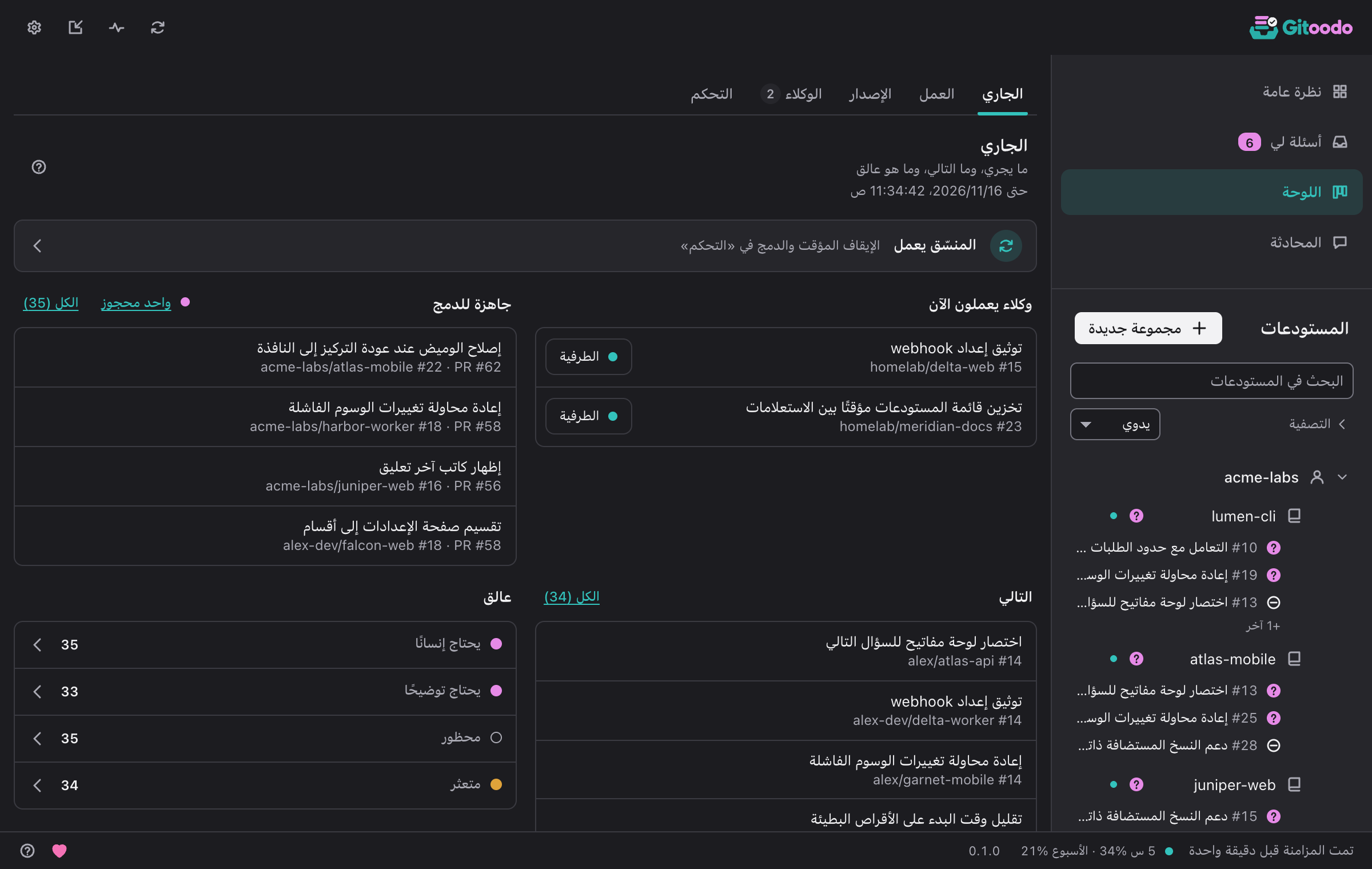
تعرض اللوحة كل مشكلة مفتوحة مع حالتها ونقاطها والوكيل الذي يعمل عليها. ويحصرها البحث والتصفية في مستودعات أو حالات أو تسميات.
- ينشئ مشكلة جديدة مشكلة، ويمكن وسمها بالجاهزة فورًا.
- يعرض جلسة الوكيل جلسة وكيل جارية في طرفية.
- يسلّم المناقشة في الدردشة المشكلة إلى المحادثة.
The board is split into subpages. In orchestrator mode they are In progress, Issues, Release, Agents and Control; in direct mode In progress, Issues and Pull requests. Gitoodo remembers the subpage you used last and opens it again. Clicking an issue anywhere on the board opens its details: repository, state, labels, priority, what it depends on, milestone, who works on it and, if it belongs to the next release, why.
قيد العمل#
ما يجري، وما التالي، وما هو عالق
In orchestrator mode this page answers "is everything moving?" at a glance. The line at the top says whether the orchestrator runs, is paused or cannot be reached; clicking it opens Control. Below it you see the Running workers (with Terminal to watch a running worker live; a note under them says how many are Left behind), the pull requests Ready to merge, the ready issues Up next in the order the dispatcher takes them (boosted issues first, then by score) and what is Stuck: issues that need a human, approval or clarification, and blocked, stalled or held ones. Click a stuck state or All to see exactly those issues under Issues.
In direct mode the page shows what needs you instead: how many questions wait in Asked of me, the counters Question open, Blocked, CI failing and Stale (a click filters the list under Issues), the recent throughput and a link to the open pull requests.
المشكلات#
المشكلات وطلبات الدمج حسب الحالة
Issues lists every issue and pull request of your switched-on repositories. In orchestrator mode they are grouped by repository: Search the board finds items by text, Filters narrow the list by repository, state or label, and Clear filters shows everything again. In a large window the list and the selected item's details sit side by side.
In orchestrator mode each row carries the actions that fit its state: Terminal for a running worker; Park, Restart or Stop to steer a worker (stopping and restarting ask first); Boost to move a ready issue to the front of the queue; and Control merge to hold or veto the pull request of an issue in review. In direct mode, Group by switches between Status, Repo, Account, Numbers (a table of counts; click a number to open the filtered list) and Needs you.
طلبات الدمج#
طلبات الدمج المفتوحة مع الفحوص وحالة الدمج
Direct mode only: every open pull request of your repositories, grouped by repository. Each one shows whether its checks passed, failed (with the name of the first failing check), are running or are missing, whether it can be merged or has a conflict, and which issues it closes. Pull requests that need a look stand out, and In progress counts them. A click opens the pull request on the forge.
الإصدار#
مدى تقدّم الإصدار التالي في كل مستودع
يستخدم تخطيط الإصدارات معالم المنصة. تدخل المشكلة الإصدار التالي بالتسمية release:next، أو كتبعية لمشكلة إصدار، أو مع priority:p0.
Release status per repository shows how far each repository's next release is and what is still open in it. Copy summary copies the release plan as text; with Attach a link to Gitoodo it ends with a link to Gitoodo.
العمّال#
كل العمّال الجارين مباشرةً، هنا وعلى أجهزة العمّال
تعرض كل بطاقة طرفيّة أحد العمّال مصغّرةً ومباشرةً. عند فتحها بحجم كبير تكون للمشاهدة فقط في البداية؛ ولا تُرسَل مفاتيحك واللصق وCtrl-C إلى العامل إلا بعد «تولَّ التحكّم» وتأكيد واحد. ما يُعرض يمرّ بالحجب نفسه الذي تمرّ به السجلات، فلا تظهر الرموز المعروفة أبدًا.
الوكلاء#
من يعمل على ماذا، وما الذي كُتب في المستودع البعيد
«متروكة» هي المشكلات التي انتهت مدة حجزها أو وُسمت بأنها متعثرة ولم يعد أي عامل يعمل عليها؛ لا تُحسب عملًا جاريًا، وباستبدال «stalled» بـ«ready» تعود إلى قائمة الانتظار.
كل كتابة على منصة الاستضافة، الأحدث أولًا
Running workers lists every issue that is really being worked on right now: first the workers this orchestrator runs (on this device or on a worker machine, named in the row), then issues another orchestrator holds with a reservation that is still valid. A reservation is valid while it has not expired and the issue is still in progress or in review. Once it has expired or the issue was flagged as stalled, the issue no longer counts as work and sits collapsed under Left behind; with “ready” instead of “stalled” it goes back into the queue. The overview's Workers tile counts the same workers and says how many run here, on a worker machine or on other machines. The row actions are the same as under Issues: Terminal opens the live terminal (macOS and Linux) and Detach leaves it while the worker keeps running; Park ends the worker and keeps the issue until a human decides, Restart starts it again in the same worktree, Stop ends it for good and hands the issue to a human.
Activity is the orchestrator's log of every write to the forge, newest first: which issue or pull request, what was written and why, marked OK or Failed. A click on the item opens it on the forge; Filter by repository narrows the log to one repository.
التحكم#
إيقاف الأتمتة مؤقتًا، حجز الدمج، إيقاف المستودعات مؤقتًا
يوقف تشغيل المنسّق/إيقافه كل شيء: لا عمل جديد ولا دمج. ويعيد الوكلاء العاملون مشكلاتهم إلى قائمة الانتظار.
أوقف طلب سحب أو ارفضه قبل أن يدمجه المنسّق. لا يمكن من هنا سحب دمج تلقائي مفعّل مسبقًا على منصة الاستضافة.
Under Repositories you pause single repositories instead of the whole orchestrator: no new workers start there, running ones finish. Resume lets the repository take work again.