उपयोगकर्ताओं के लिए · रोज़ का काम
बोर्ड
इस पेज के कुछ हिस्से अभी हिन्दी में उपलब्ध नहीं हैं और अंग्रेज़ी में दिखाए गए हैं।
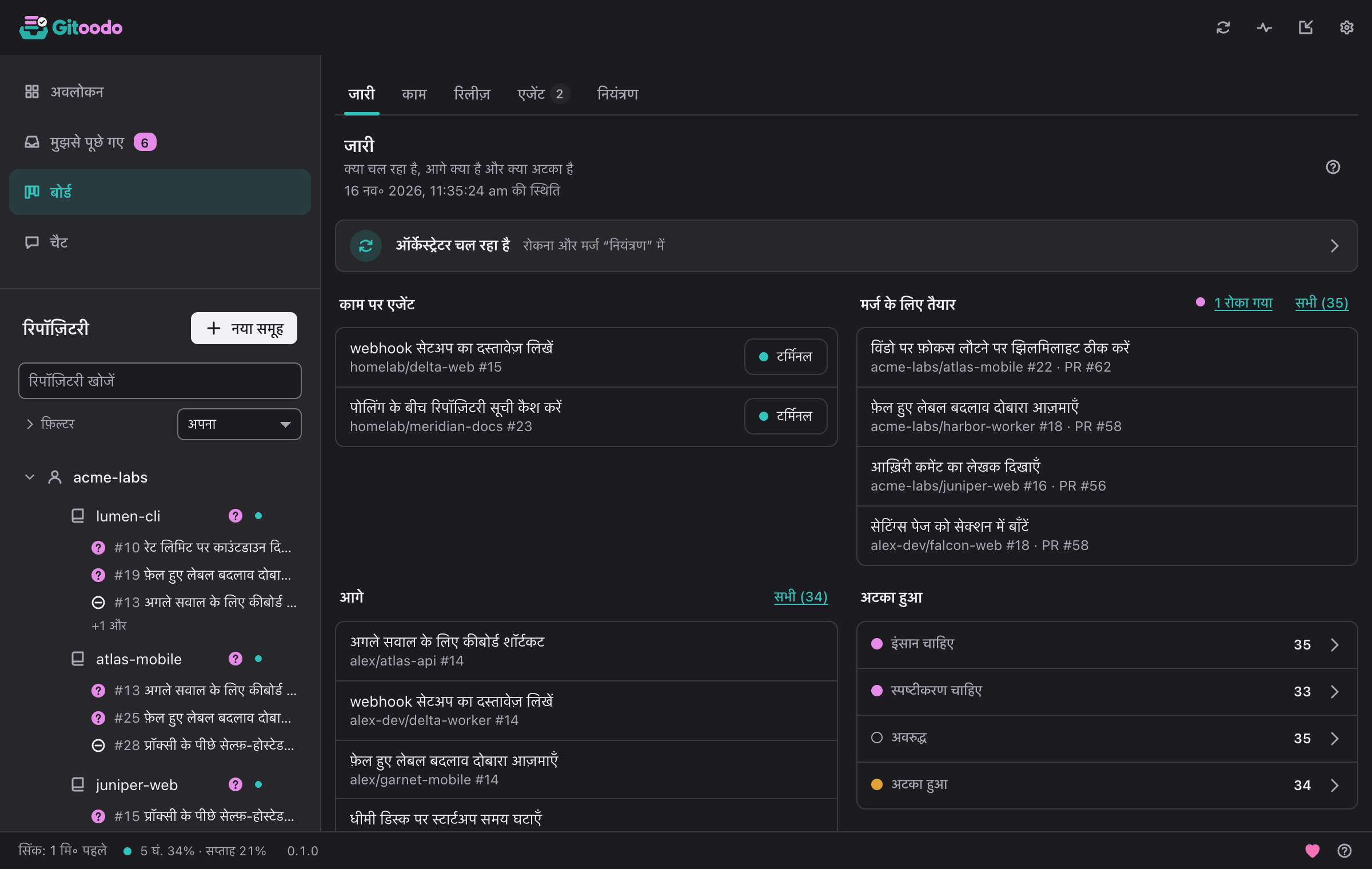
बोर्ड हर खुले इश्यू को उसकी स्थिति, स्कोर और उस पर काम कर रहे एजेंट के साथ दिखाता है। खोज और फ़िल्टर उसे रिपॉज़िटरी, अवस्था या लेबल तक सीमित करते हैं।
- नया इश्यू एक इश्यू बनाता है, चाहें तो तुरंत तैयार के रूप में।
- एजेंट सत्र किसी एजेंट का चल रहा सत्र टर्मिनल में दिखाता है।
- चैट में चर्चा करें किसी इश्यू को चैट को सौंपता है।
The board is split into subpages. In orchestrator mode they are In progress, Issues, Release, Agents and Control; in direct mode In progress, Issues and Pull requests. Gitoodo remembers the subpage you used last and opens it again. Clicking an issue anywhere on the board opens its details: repository, state, labels, priority, what it depends on, milestone, who works on it and, if it belongs to the next release, why.
काम जारी#
क्या चल रहा है, आगे क्या है और क्या अटका है
In orchestrator mode this page answers "is everything moving?" at a glance. The line at the top says whether the orchestrator runs, is paused or cannot be reached; clicking it opens Control. Below it you see the Running workers (with Terminal to watch a running worker live; a note under them says how many are Left behind), the pull requests Ready to merge, the ready issues Up next in the order the dispatcher takes them (boosted issues first, then by score) and what is Stuck: issues that need a human, approval or clarification, and blocked, stalled or held ones. Click a stuck state or All to see exactly those issues under Issues.
In direct mode the page shows what needs you instead: how many questions wait in Asked of me, the counters Question open, Blocked, CI failing and Stale (a click filters the list under Issues), the recent throughput and a link to the open pull requests.
इश्यू#
स्थिति के अनुसार इश्यू और पुल रिक्वेस्ट
Issues lists every issue and pull request of your switched-on repositories. In orchestrator mode they are grouped by repository: Search the board finds items by text, Filters narrow the list by repository, state or label, and Clear filters shows everything again. In a large window the list and the selected item's details sit side by side.
In orchestrator mode each row carries the actions that fit its state: Terminal for a running worker; Park, Restart or Stop to steer a worker (stopping and restarting ask first); Boost to move a ready issue to the front of the queue; and Control merge to hold or veto the pull request of an issue in review. In direct mode, Group by switches between Status, Repo, Account, Numbers (a table of counts; click a number to open the filtered list) and Needs you.
पुल रिक्वेस्ट#
खुले पुल रिक्वेस्ट, उनकी जाँच और मर्ज की स्थिति
Direct mode only: every open pull request of your repositories, grouped by repository. Each one shows whether its checks passed, failed (with the name of the first failing check), are running or are missing, whether it can be merged or has a conflict, and which issues it closes. Pull requests that need a look stand out, and In progress counts them. A click opens the pull request on the forge.
रिलीज़#
हर रिपॉज़िटरी में अगली रिलीज़ कितनी आगे है
रिलीज़ योजना फ़ोर्ज के माइलस्टोन का उपयोग करती है। कोई इश्यू अगली रिलीज़ में release:next लेबल से, किसी रिलीज़ इश्यू की निर्भरता के रूप में या priority:p0 से आता है।
Release status per repository shows how far each repository's next release is and what is still open in it. Copy summary copies the release plan as text; with Attach a link to Gitoodo it ends with a link to Gitoodo.
वर्कर#
सभी चल रहे वर्कर, लाइव, यहाँ और वर्कर कंप्यूटरों पर
हर टाइल किसी वर्कर का टर्मिनल छोटा और लाइव दिखाती है। बड़ा खोलने पर वह पहले सिर्फ़ देखने के लिए होता है; केवल “नियंत्रण लें” और एक पुष्टि के बाद आपकी कुंजियाँ, पेस्ट और Ctrl-C वर्कर को जाते हैं। जो दिखता है वह लॉग जैसी ही छँटाई से गुज़रता है, इसलिए ज्ञात टोकन कभी नहीं दिखते।
एजेंट#
कौन किस पर काम कर रहा है और फ़ोर्ज पर क्या लिखा गया
“छूटे हुए” वे इश्यू हैं जिनका आरक्षण समाप्त हो गया या जिन्हें अटका हुआ चिह्नित किया गया और जिनके लिए अब कोई वर्कर नहीं चल रहा; ये काम में नहीं गिने जाते, और “stalled” की जगह “ready” लगाने पर ये फिर से कतार में आ जाते हैं।
फ़ोर्ज पर हर लेखन, सबसे नया पहले
Running workers lists every issue that is really being worked on right now: first the workers this orchestrator runs (on this device or on a worker machine, named in the row), then issues another orchestrator holds with a reservation that is still valid. A reservation is valid while it has not expired and the issue is still in progress or in review. Once it has expired or the issue was flagged as stalled, the issue no longer counts as work and sits collapsed under Left behind; with “ready” instead of “stalled” it goes back into the queue. The overview's Workers tile counts the same workers and says how many run here, on a worker machine or on other machines. The row actions are the same as under Issues: Terminal opens the live terminal (macOS and Linux) and Detach leaves it while the worker keeps running; Park ends the worker and keeps the issue until a human decides, Restart starts it again in the same worktree, Stop ends it for good and hands the issue to a human.
Activity is the orchestrator's log of every write to the forge, newest first: which issue or pull request, what was written and why, marked OK or Failed. A click on the item opens it on the forge; Filter by repository narrows the log to one repository.
नियंत्रण#
ऑटोमेशन रोकें, मर्ज रोकें, रिपॉज़िटरी रोकें
ऑर्केस्ट्रेटर चालू/बंद सब कुछ रोक देता है: न नया काम, न मर्ज। चल रहे एजेंट अपने इश्यू कतार में लौटा देते हैं।
ऑर्केस्ट्रेटर के मर्ज करने से पहले पुल रिक्वेस्ट रोकें या वीटो करें। फ़ोर्ज पर पहले से चालू ऑटो-मर्ज यहाँ से वापस नहीं लिया जा सकता।
Under Repositories you pause single repositories instead of the whole orchestrator: no new workers start there, running ones finish. Resume lets the repository take work again.