面向用户 · 日常使用
看板
此页面的部分内容尚无中文(简体)版本,以英文显示。
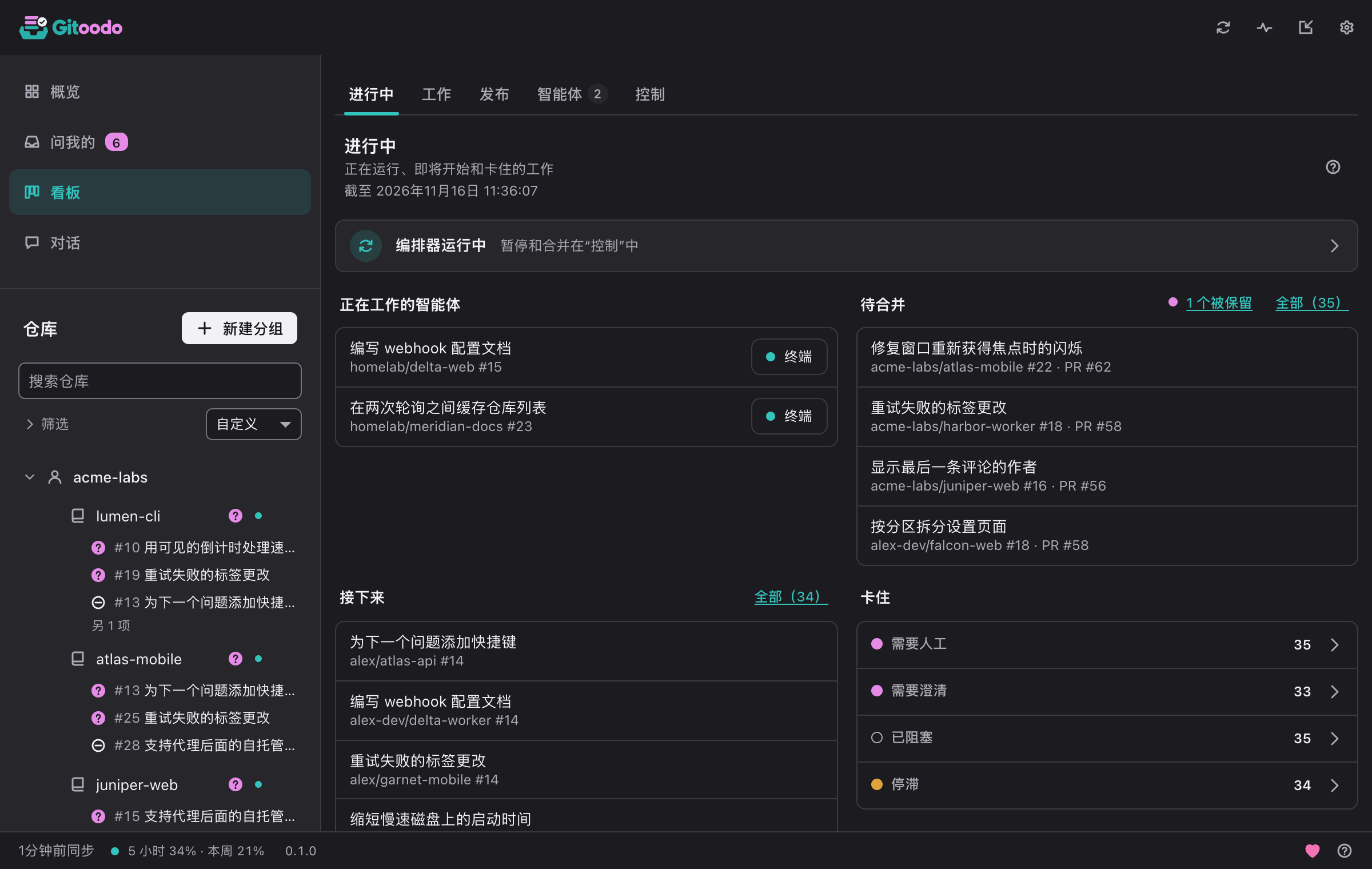
看板显示每个未关闭的议题,及其状态、评分和正在处理它的智能体。搜索和筛选可按仓库、状态或标签缩小范围。
- 新建议题可创建议题,并可立即标记为就绪。
- 智能体会话在终端中显示智能体正在运行的会话。
- 在聊天中讨论把议题交给对话。
The board is split into subpages. In orchestrator mode they are In progress, Issues, Release, Agents and Control; in direct mode In progress, Issues and Pull requests. Gitoodo remembers the subpage you used last and opens it again. Clicking an issue anywhere on the board opens its details: repository, state, labels, priority, what it depends on, milestone, who works on it and, if it belongs to the next release, why.
进行中#
正在运行、即将开始和卡住的工作
In orchestrator mode this page answers "is everything moving?" at a glance. The line at the top says whether the orchestrator runs, is paused or cannot be reached; clicking it opens Control. Below it you see the Running workers (with Terminal to watch a running worker live; a note under them says how many are Left behind), the pull requests Ready to merge, the ready issues Up next in the order the dispatcher takes them (boosted issues first, then by score) and what is Stuck: issues that need a human, approval or clarification, and blocked, stalled or held ones. Click a stuck state or All to see exactly those issues under Issues.
In direct mode the page shows what needs you instead: how many questions wait in Asked of me, the counters Question open, Blocked, CI failing and Stale (a click filters the list under Issues), the recent throughput and a link to the open pull requests.
议题#
按状态查看议题和拉取请求
Issues lists every issue and pull request of your switched-on repositories. In orchestrator mode they are grouped by repository: Search the board finds items by text, Filters narrow the list by repository, state or label, and Clear filters shows everything again. In a large window the list and the selected item's details sit side by side.
In orchestrator mode each row carries the actions that fit its state: Terminal for a running worker; Park, Restart or Stop to steer a worker (stopping and restarting ask first); Boost to move a ready issue to the front of the queue; and Control merge to hold or veto the pull request of an issue in review. In direct mode, Group by switches between Status, Repo, Account, Numbers (a table of counts; click a number to open the filtered list) and Needs you.
拉取请求#
未关闭的拉取请求及其检查和合并状态
Direct mode only: every open pull request of your repositories, grouped by repository. Each one shows whether its checks passed, failed (with the name of the first failing check), are running or are missing, whether it can be merged or has a conflict, and which issues it closes. Pull requests that need a look stand out, and In progress counts them. A click opens the pull request on the forge.
发布#
每个仓库距离下一次发布还有多远
版本规划使用代码托管平台的里程碑。议题通过 release:next 标签、作为发布议题的依赖项或带有 priority:p0 进入下一个版本。
Release status per repository shows how far each repository's next release is and what is still open in it. Copy summary copies the release plan as text; with Attach a link to Gitoodo it ends with a link to Gitoodo.
工作进程#
所有正在运行的工作进程,实时显示,包括本机和工作机
每个磁贴都以缩小、实时的方式显示一个工作进程的终端。放大后默认仅供查看;只有点“接管”并确认后,你的按键、粘贴内容和 Ctrl-C 才会发送给工作进程。显示的内容会经过与日志相同的脱敏处理,已知的令牌绝不会出现。
智能体#
谁在做什么,以及写入代码托管平台的记录
“已搁置”指预留已过期或被标记为停滞、且已没有工作进程在运行的议题;它们不计为进行中的工作,把“stalled”换成“ready”后会重新排队。
每一次对代码托管平台的写入,最新的在前
Running workers lists every issue that is really being worked on right now: first the workers this orchestrator runs (on this device or on a worker machine, named in the row), then issues another orchestrator holds with a reservation that is still valid. A reservation is valid while it has not expired and the issue is still in progress or in review. Once it has expired or the issue was flagged as stalled, the issue no longer counts as work and sits collapsed under Left behind; with “ready” instead of “stalled” it goes back into the queue. The overview's Workers tile counts the same workers and says how many run here, on a worker machine or on other machines. The row actions are the same as under Issues: Terminal opens the live terminal (macOS and Linux) and Detach leaves it while the worker keeps running; Park ends the worker and keeps the issue until a human decides, Restart starts it again in the same worktree, Stop ends it for good and hands the issue to a human.
Activity is the orchestrator's log of every write to the forge, newest first: which issue or pull request, what was written and why, marked OK or Failed. A click on the item opens it on the forge; Filter by repository narrows the log to one repository.
控制#
暂停自动化、保留合并、暂停仓库
编排器开/关会停止一切:不开始新工作,也不合并。正在运行的智能体会把议题交还到队列中。
在编排器合并之前暂缓或否决拉取请求。已在代码托管平台上启用的自动合并无法从这里撤回。
Under Repositories you pause single repositories instead of the whole orchestrator: no new workers start there, running ones finish. Resume lets the repository take work again.